Free Android app for YouTube creators

Paste a URL.
Get the tags.

Tags Tool pulls the tags, keywords, thumbnails, titles and descriptions behind any YouTube video — then ranks each tag and keyword with a previous-day comparison and a trend arrow. Research competitors, ride today's trending tags, and power up your own video SEO, all from your phone. No account, no cost.

🏷️ Extract video tags 📈 Tag & keyword ranks 🔥 Today's trending tags 🖼️ Full-res thumbnails ⚡ Share-to-Tags Tool
✓ 100% free✓ No account needed✓ Share-to-Tags Tool
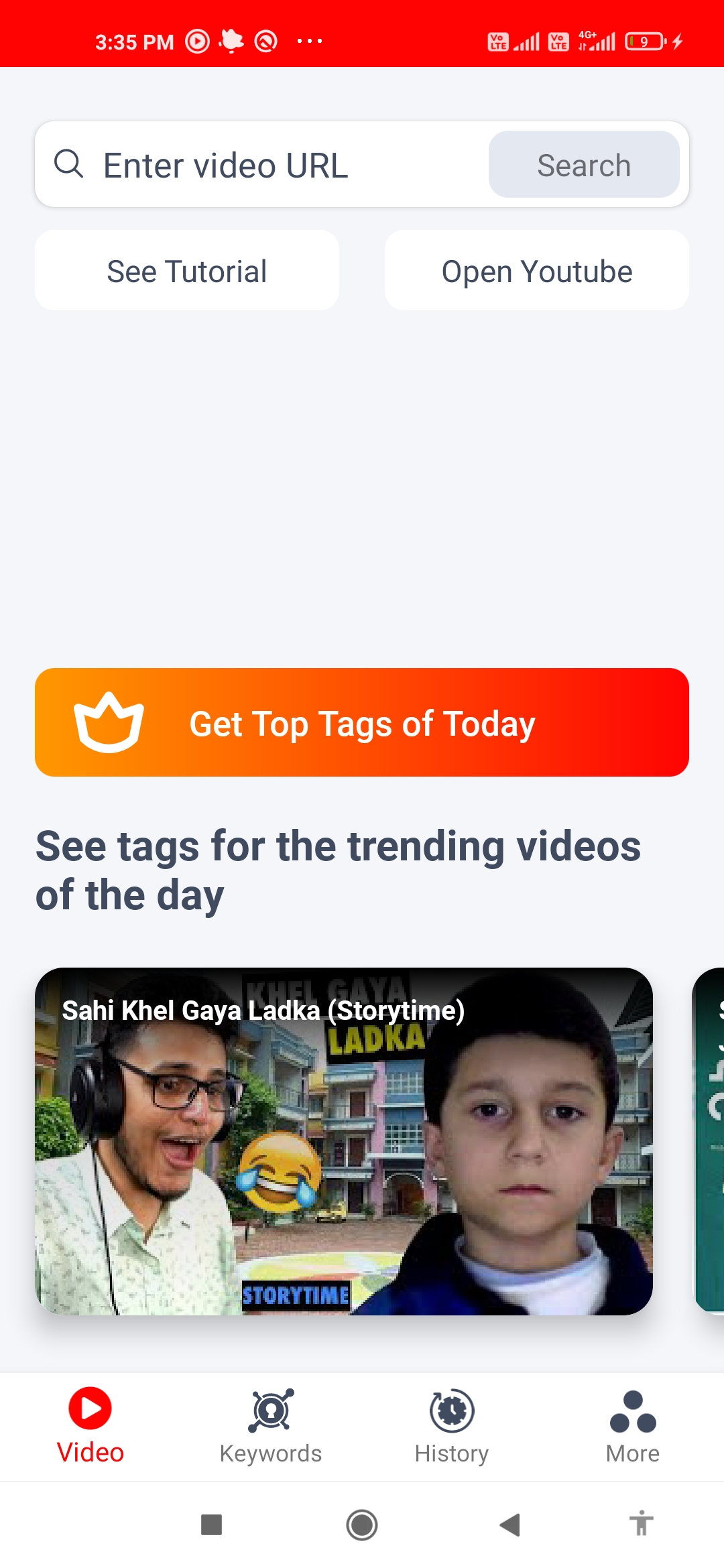
Tags Tool home screen — paste a YouTube video URL to get its tags
Free
To download & use
1-tap
Share from YouTube
Trends
Daily tag & keyword ranks
Android
Works on any phone
Features

Everything you need to research a YouTube video

Built for creators who want to know exactly which tags, keywords and thumbnails are driving the videos in their niche — and how their own channel is growing.

🏷️ Tag & keyword research
🏷️

Extract video tags

Paste any YouTube video URL and instantly reveal the tags behind it. Select the ones that fit your video and copy them with a single tap — no manual typing.

📈

Tag ranking & trends

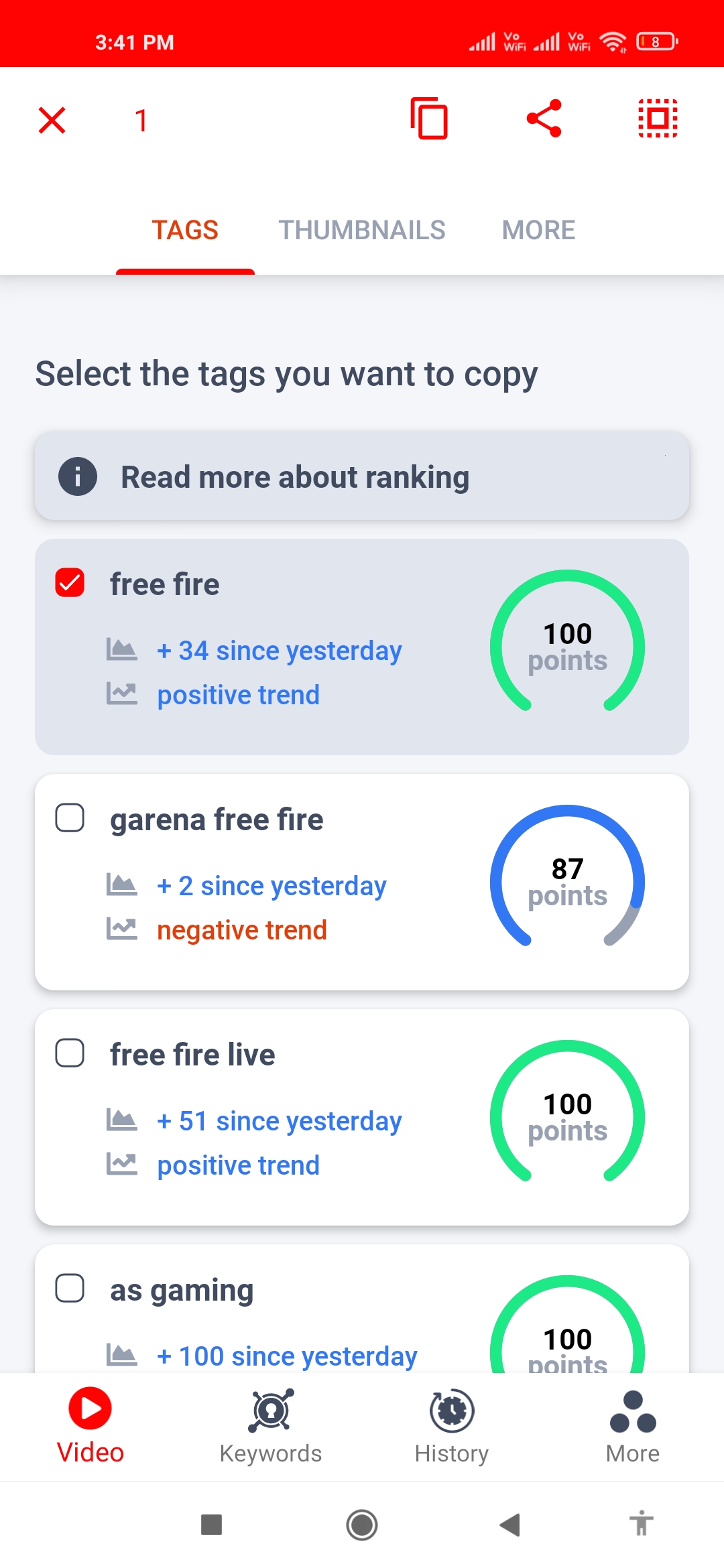
Every tag carries a ranking score, a previous-day comparison and a positive or negative trend arrow, so you can tell which tags are gaining momentum and which are fading.

🔑

Keyword ranking & trends

Search a custom keyword and get its ranking, a day-over-day comparison and the same trend signals — so you target keywords that are actually moving in your niche.

🔥

Today's trending tags

See the top tags of the day plus recently trending ones, pulled straight from today's trending videos — a ready-made shortlist of what's hot right now.

🖼️ Thumbnails & metadata
🖼️

Full-resolution thumbnails

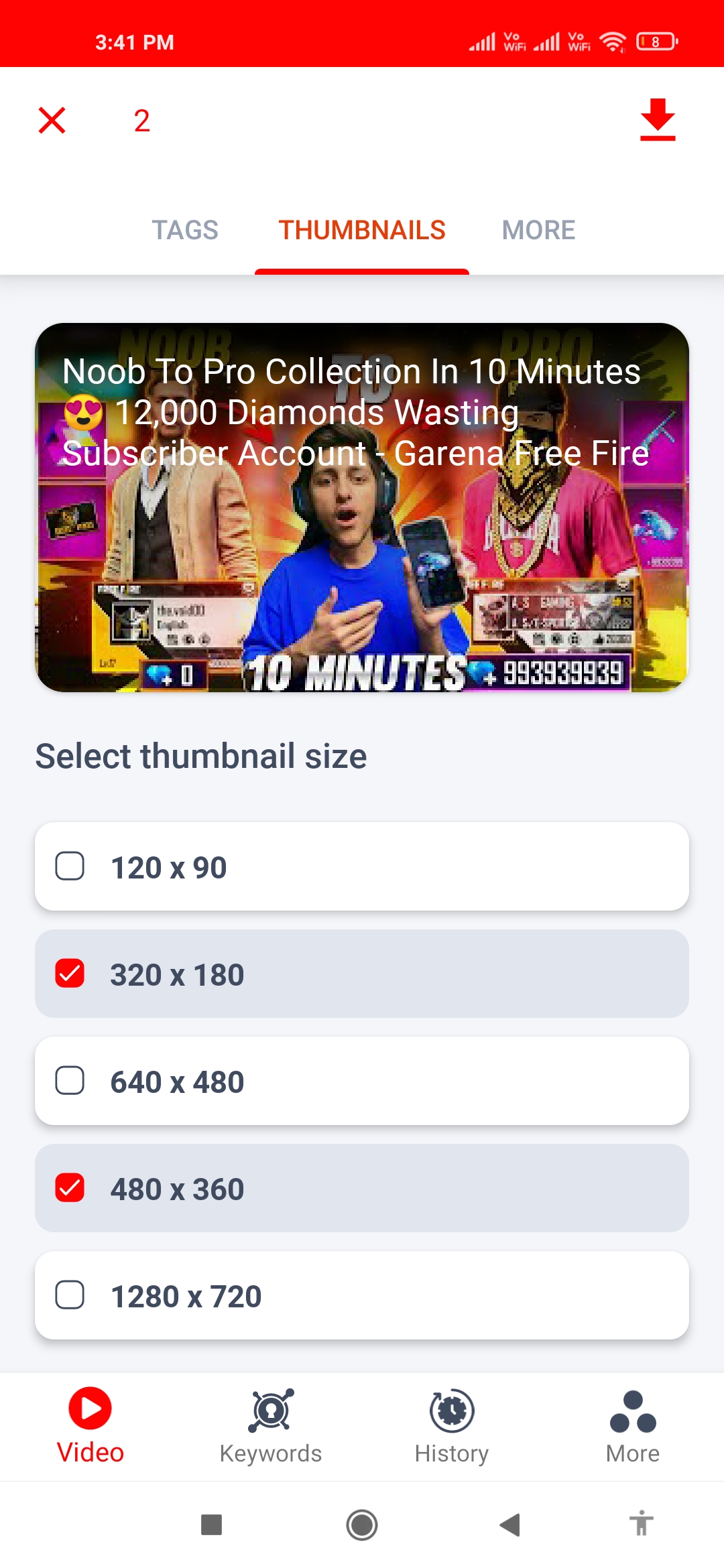
Grab the thumbnail of any video you search in multiple sizes — from a small 120×90 preview up to the full 1280×720 HD image — to study what makes it click-worthy.

📝

Titles & descriptions

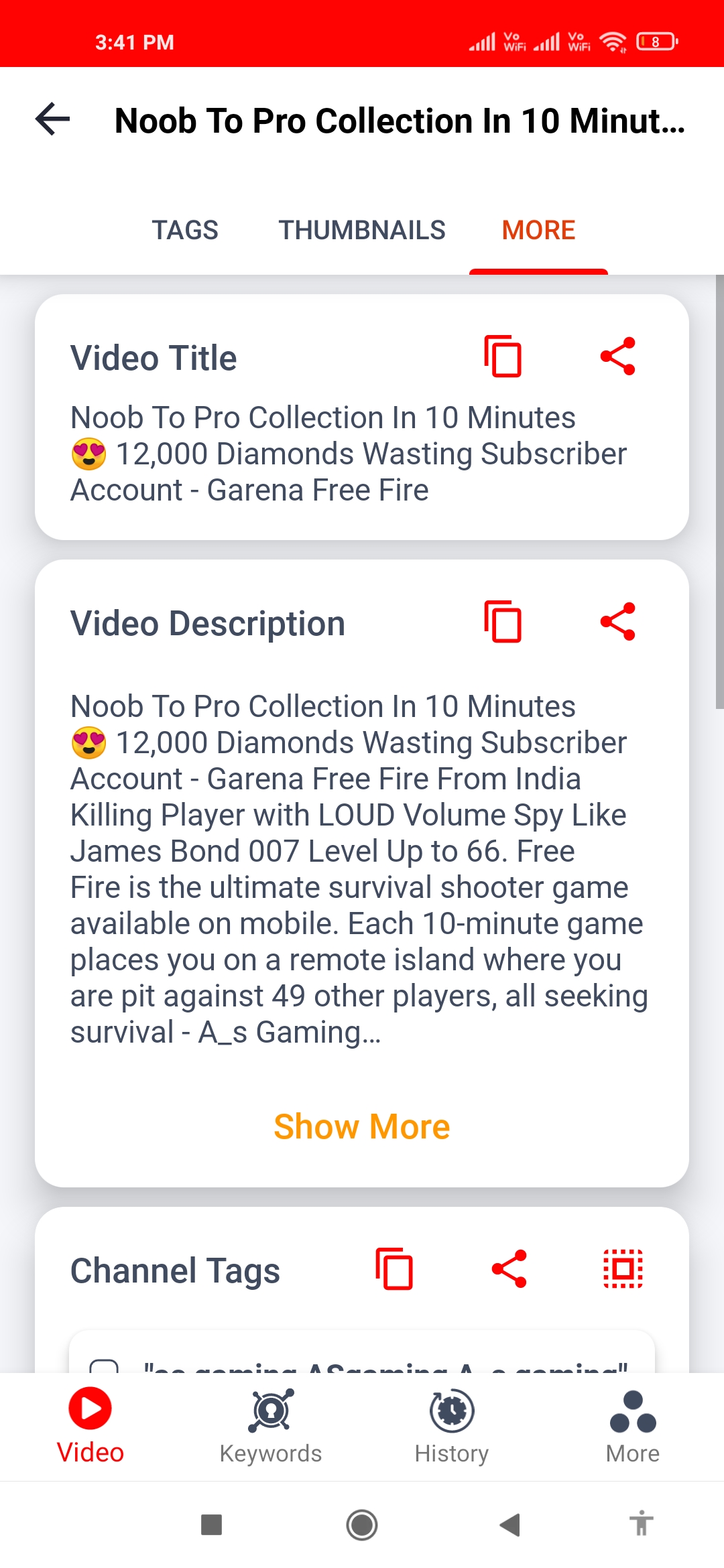
Read, copy or share the full video title and description in seconds — perfect for studying how top videos frame their hook and structure their description.

🎬

Channel-specific tags

Get access to the video description alongside channel-specific tags, so you can see the broader keyword strategy a creator uses across their content.

📤

Copy & share anything

Tags, titles, descriptions and thumbnails are all copy- or share-ready, so the research you do flows straight into your own upload without retyping a thing.

🔎 Competitor insights
🔎

Competitor video search

Search a custom keyword to surface competitor videos with their tags and rankings, so you can benchmark exactly how other creators rank for the topics you care about.

📊

Channel insights & stats

Go beyond a single video and view broader channel insights and stats, including subscriber count, to understand the bigger picture behind a creator's growth.

⏱️

Video & audience retention

Check whether videos are really keeping viewers engaged and closely monitor view time over specific periods, so you learn which formats hold attention.

📐

Per-video metrics

Monitor specific metrics for individual videos and see how each one performs over time, so you can spot the patterns behind your best uploads.

⚡ Workflow & growth

Share straight from YouTube

Open any YouTube video, tap Share, and pick Tags Tool from the app drawer — all of its details appear instantly. No copy-pasting URLs back and forth.

🕓

Always-available history

Every tag and keyword lookup is saved to your history, so you can jump back to a previous search any time without re-entering the URL or keyword.

🎯

Personalized growth goals

Create personalized goals and track your progress toward them, so research turns into a clear plan for growing your channel milestone by milestone.

🏆

Monetization & Play Button tracking

Track your progress toward monetization and see how far you are from your next YouTube Play Button, turning long-term goals into something you can watch tick upward.

How it works

From video link to copyable tags

A few taps. No account, no setup, nothing to learn.

1

Open a video

Paste a YouTube URL straight into Tags Tool, or open any video in the YouTube app, tap Share, and pick Tags Tool from the app drawer.

2

See every detail

Tags, keyword rankings, thumbnails, title and description all load together — swipe through clean tabs to find exactly what you came for.

3

Read the rankings

Check each tag and keyword's ranking, its previous-day comparison and trend arrow, so you keep the ones with real momentum and skip the dead weight.

4

Scout the competition

Run a custom keyword search to pull up competitor videos with their tags and rankings, then layer in today's trending tags for fresh ideas.

5

Copy, grab & reuse

Select the tags you want, pick a thumbnail size, then copy or share title, description and tags straight into your own upload.

6

Track your growth

Set personalized goals, watch channel insights and retention, and keep an eye on monetization and your next Play Button — all in one place.

Built for

Made for creators who research before they upload

Whoever you make videos for, Tags Tool turns guesswork into informed decisions.

📹

Long-form YouTubers

Reverse-engineer the tags, titles and descriptions of the videos already winning in your niche, then build metadata that gives your next upload a fair shot at the same audience.

📱

Shorts & reels creators

Move fast on today's trending tags and recently surging keywords, so your short-form content rides momentum while a topic is still hot instead of after it cools off.

🚀

New & growing channels

Skip the trial and error. Study what's working, set personalized goals, and track your progress toward monetization and your first Play Button as the channel grows.

🏢

Agencies & managers

Benchmark competitors with keyword searches, pull channel insights and retention data, and keep a saved history of every lookup to inform client strategy on the go.

FAQ

Frequently asked

Everything you might want to know before you install.

How do I use Tags Tool?+

There are two simple ways:

  1. Open Tags Tool and paste the URL of the video whose tags, title, description and thumbnail you want.
  2. Or open YouTube, tap the Share button on any video, and choose Tags Tool from the app drawer.

Either way, all of the video's details appear inside the app instantly.

Is Tags Tool really free?+

Yes. Tags Tool is free to download and free to use, and you don't need to create an account or sign in to get started. Just install it, paste a URL or share a video, and you're researching.

What do the tag and keyword rankings mean?+

Each tag and keyword comes with a ranking score, a comparison against the previous day, and a positive or negative trend arrow. Together they show you whether a tag is climbing or slipping, so you can prioritize the ones with real momentum instead of guessing.

What thumbnail sizes can I download?+

You can grab full-resolution thumbnails for any video you search, in several sizes ranging from a small 120×90 preview up to the full 1280×720 HD image — handy for studying what makes a thumbnail click-worthy.

Can I research my competitors?+

Yes. Run a custom keyword search to see competitor videos along with their tags and rankings, and view broader channel insights and stats — including subscriber count, audience retention and per-video metrics — to understand what's driving their growth.

Does it remember my past searches?+

It does. Tags Tool keeps an always-available history for both tags and keywords, so you can jump back to any previous lookup without re-entering the URL or keyword.

Tags Tool isn't working — what should I do?+

First, make sure you pasted a valid YouTube video URL and that you have an internet connection, then try again in a moment. If it still won't load, email us at androdeveloper24@gmail.com and we'll help if we can.

100% Free

Start researching smarter tags.

Free to download. Free to use. Get the tags, keywords and thumbnails behind any YouTube video.

No account. No cost. Just paste and go.

▶ Get it on Google Play